Unreal Engine 5 Plugin
Project File Browser
Discovers, displays, and previews non-Unreal asset files directly inside Unreal Engine's Content Browser.
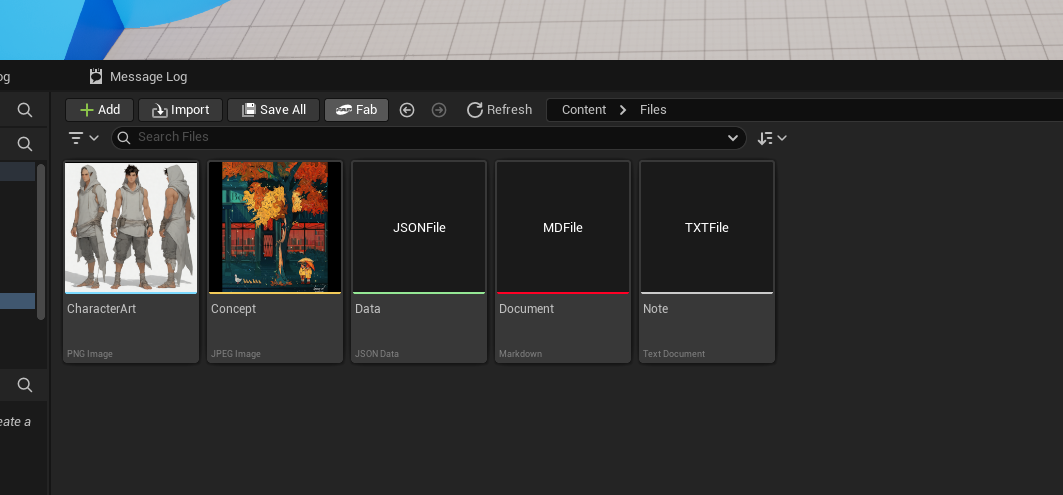
Plugin Overview
Project File Browser brings raw project files (.png, .jpg, .jpeg, .json, .txt, .md, and any configured custom extensions) into Unreal Engine's Content Browser alongside standard .uasset files without requiring importation or asset conversions.
- Native Content Browser Experience: Custom files appear in their respective folders in the path hierarchy (/Game, Plugin roots, etc.).
- Dynamic Image Thumbnails: Automatically loads and generates 256×256 aspect-ratio-preserved thumbnails for images.
- On-Disk Hot Reloading: Automatically invalidates and refreshes thumbnails when files on disk are edited in external software.
- External Tool Launch: Double-clicking opens the file in the operating system's registered application.
Project Settings Configuration
All settings are located under Edit > Project Settings > Editor > Project File Browser.
| Property | Type | Default | Description |
|---|---|---|---|
bEnableFileBrowser |
Boolean | true |
Enables or disables the custom project file data source. |
MonitoredExtensions |
Array | PNG, JPG, JPEG, JSON, TXT | List of extension configuration entries. |
Extension Config Entry Properties
| Field | Type | Description |
|---|---|---|
| Extension | FString | File extension without leading dot (e.g. png, md, json). |
| DisplayName | FText | Display name shown on the Content Browser tile (e.g. Markdown Document). |
| AccentColor | FLinearColor | Color strip displayed at the bottom edge of the tile. |
| bGenerateImageThumbnail | Boolean | If true, parses image pixels and renders the file as a thumbnail. |
How to Use
- Drop files (e.g.
icon.png,notes.md,data.json) into your project'sContent/directory. - Open the Content Browser and navigate to that folder. The files appear immediately.
- Double-Click any file to open it in its default desktop program (VS Code, Photoshop, Notepad, etc.).
- Right-Click to view actions such as Open in Default Program or Show in Explorer.
Note: Modifying an image in external tools (like Photoshop or Aseprite) will update the thumbnail in the Content Browser on save.
Technical Information
- Module Type: Editor (Developer / Content Management)
- Loading Phase: Default
- Supported Development Platforms: Win64
- Supported Target Platforms: Win64
- Network Replicated: No (Editor-only utility)
- Dependencies: Unreal Engine built-in
ContentBrowserFileDataSourceplugin.